
這個作品非常的粗糙,也不是任何網站提出的專案練習,純粹突發奇想去找公用的API來練習。
程式有許許多多的瑕疵,在最後會一併說明。
HTML
<!DOCTYPE html>
<html lang="en">

<head>
  <meta charset="UTF-8">
  <meta name="viewport" content="width=device-width, initial-scale=1.0">
  <meta http-equiv="X-UA-Compatible" content="ie=edge">
  <title>Currency Exchanger</title>
  <link rel="stylesheet" href="https://stackpath.bootstrapcdn.com/bootstrap/4.2.1/css/bootstrap.min.css"
    integrity="sha384-GJzZqFGwb1QTTN6wy59ffF1BuGJpLSa9DkKMp0DgiMDm4iYMj70gZWKYbI706tWS" crossorigin="anonymous">
  <link rel="stylesheet" href="style.css">
</head>

<body>

  <body>
    <div class="container">
      <div class="input-group mb-3">
        <div class="input-group-prepend">
          <label class="input-group-text" for="inputGroupSelect01">從</label>
        </div>
        <select class="custom-select" id="inputGroupSelect01">
          <option value="CNY">人民幣(CNY)</option>
          <option value="JPY">日幣(JPY)</option>
          <option value="USD" selected>美元(USD)</option>
        </select>
      </div>
      <div class="input-group mb-3">
        <input type="text" id='start' placeholder='請輸入金額' class='text-center'>
      </div>

      <div class="input-group mb-3">
        <div class="input-group-prepend">
          <label class="input-group-text" for="inputGroupSelect01">轉為</label>
        </div>
        <select class="custom-select" id="inputGroupSelect03" aria-label="Example select with button addon">
          <option value="USD" selected>美元(USD)</option>
          <option value="CNY">人民幣(CNY)</option>
          <option value="JPY">日幣(JPY)</option>
        </select>
      </div>
      <div class="result text-center">
        <button class="exchange m-2">轉換!</button>
        <div class="panel-body">這裡將會顯示結果</div>
      </div>
    </div>
    <script src="https://code.jquery.com/jquery-3.3.1.slim.min.js"
      integrity="sha384-q8i/X+965DzO0rT7abK41JStQIAqVgRVzpbzo5smXKp4YfRvH+8abtTE1Pi6jizo"
      crossorigin="anonymous"></script>
    <script src="https://cdnjs.cloudflare.com/ajax/libs/popper.js/1.14.6/umd/popper.min.js"
      integrity="sha384-wHAiFfRlMFy6i5SRaxvfOCifBUQy1xHdJ/yoi7FRNXMRBu5WHdZYu1hA6ZOblgut"
      crossorigin="anonymous"></script>
    <script src="https://stackpath.bootstrapcdn.com/bootstrap/4.2.1/js/bootstrap.min.js"
      integrity="sha384-B0UglyR+jN6CkvvICOB2joaf5I4l3gm9GU6Hc1og6Ls7i6U/mkkaduKaBhlAXv9k"
      crossorigin="anonymous"></script>
    <script src="https://cdnjs.cloudflare.com/ajax/libs/axios/0.18.0/axios.min.js"></script>
    <script src="main.js"></script>
  </body>

</body>

</html>
CSS
* {
  -webkit-box-sizing: border-box;
     -moz-box-sizing: border-box;
          box-sizing: border-box;
}

.container {
  height:800px;
  width:1000px;
  display:flex;
  justify-content:center;
  align-items:center;
  flex-direction:column;
}

input {
  width:100%;
}
Javascript
let button = document.querySelector('button')
let display = document.querySelector('.panel-body')
let start_select = document.getElementById('inputGroupSelect01')
let end_select = document.getElementById('inputGroupSelect03')
let start = document.getElementById('start')
const regrex = /^[0-9]*[1-9][0-9]*$/

function exchange(e) {
  axios
    .get('https://api.exchangeratesapi.io/latest')
    .then(response => {
      //防呆處理
      if (!regrex.test(start.value)) {
        alert("請輸入金額")
        display.style.display = 'none';
      } else {
        //由於取得的API資料是歐元兌其他外幣,當其他外幣間互相轉換時,先將該外幣換成歐元,也因此會出現一些誤差
        display.innerText = parseFloat(response.data.rates[end_select.value]) * parseFloat(start.value) / parseFloat(response.data.rates[start_select.value])
      }
    })
    .catch(error => console.log(error))
}
button.addEventListener('click', exchange)
最終成品
https://windate3411.github.io/currency_exchange/.
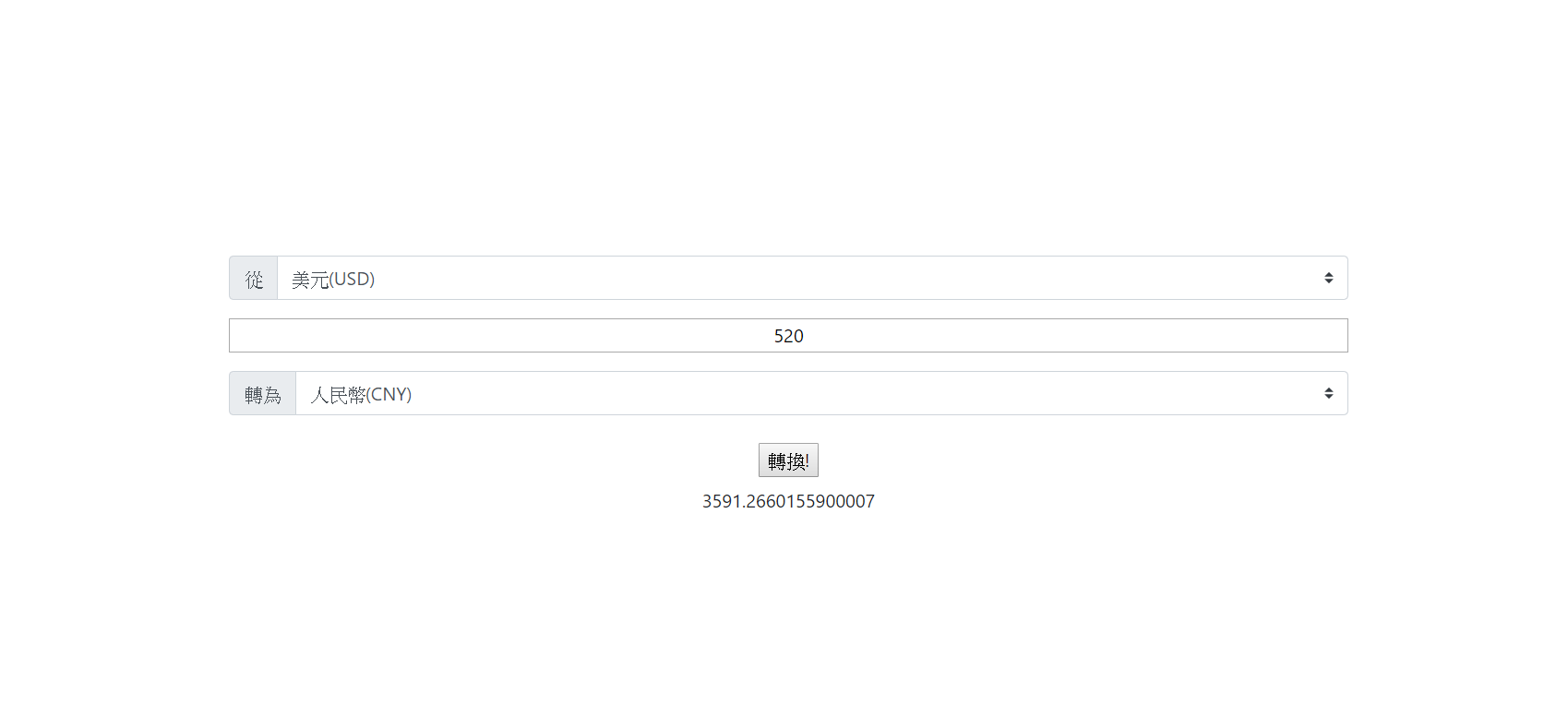
在這小專案中有幾個點需要特別做紀錄
- 取得的API資料是以歐元為交換主體,所以在其它外幣的互換間需要先將其他外幣轉為歐元
- 取得的API資料並沒有TWD…我試過讓新台幣也可以轉換,但程式碼變得很像義大利麵,暫時先移除,待我想到更好的方法再修正。
- 版面配置為bootstrap的custom select再做修改,輕鬆愉快
- 運用selcet元素時,加入selected可以讓該option變為預設選項
 Danny的學習紀錄